Thursday, June 14, 2018

Free Acting Resume Template Download [.docx]

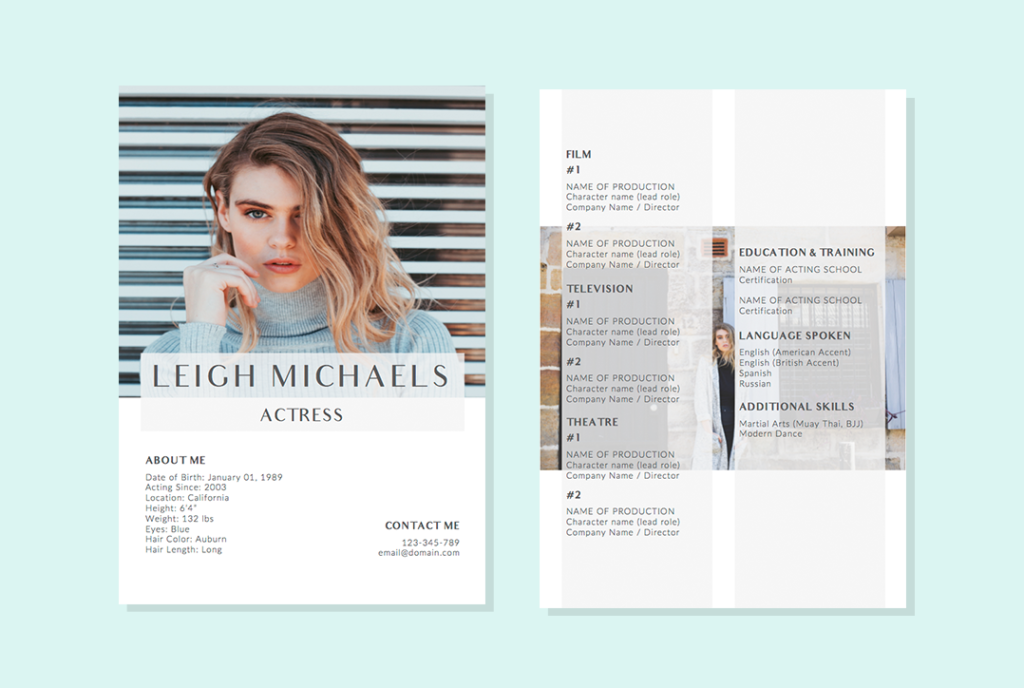
Completed an acting gig? Looking for your first casting call? Let us help you place your best act in front of your interviewers with the Leigh Michaels Resume Template. Best of all, it is free!

How to Download this Acting Resume Template?

Just click the download link below and you are on your way ↓ ↓ ↓ ↓

Free Download Acting Resume

You will receive a .zip file that contains the acting CV template in A4 size, along with its PDF version to show you how it looks like. Be sure to install the fonts located in the “Fonts” folder first, before you open the Word document. Otherwise your Word document might not look like its PDF equivalent.

Unlike any other acting CVs out in the market, this template is specifically designed to highlight everything about an actor or actress. There is an “About Me” section, where you can tell a potential employer everything they need to know about you, such as your age, location, height, weight, eyes color, hair length, hair color, and more.

A second page is included to show your past experiences, education & training, languages, additional skills – if any. To give future employers a better look, pictures of yourself could also be included in the acting resume template.

Here’s how to insert your own picture in the template:

Replacing Your Photos in the Word Template

First of all, make sure that you have all the fonts installed before you open the document in Microsoft Word or Word for Mac. Then, follow the steps below:

  1. Click on the picture that you want to replace
  2. Go to the “Format” tab
  3. Click on the little arrow next to “Fill” and select “Fill Effects…”
  4. Add your picture at the “Picture” tab and click on OK

That’s how easy it is to add your own pictures in the resume template.

You could further customized the template such as changing the colors of the fonts and backgrounds to suit your preferences.

We hope this free actor/actress resume template helps you in your acting career.

The post Free Acting Resume Template Download [.docx] appeared first on Resumeshoppe.com.

https://ift.tt/2t7Tyf7


from WordPress https://loulouwakefield.wordpress.com/2018/06/14/free-acting-resume-template-download-docx/

Thursday, March 1, 2018

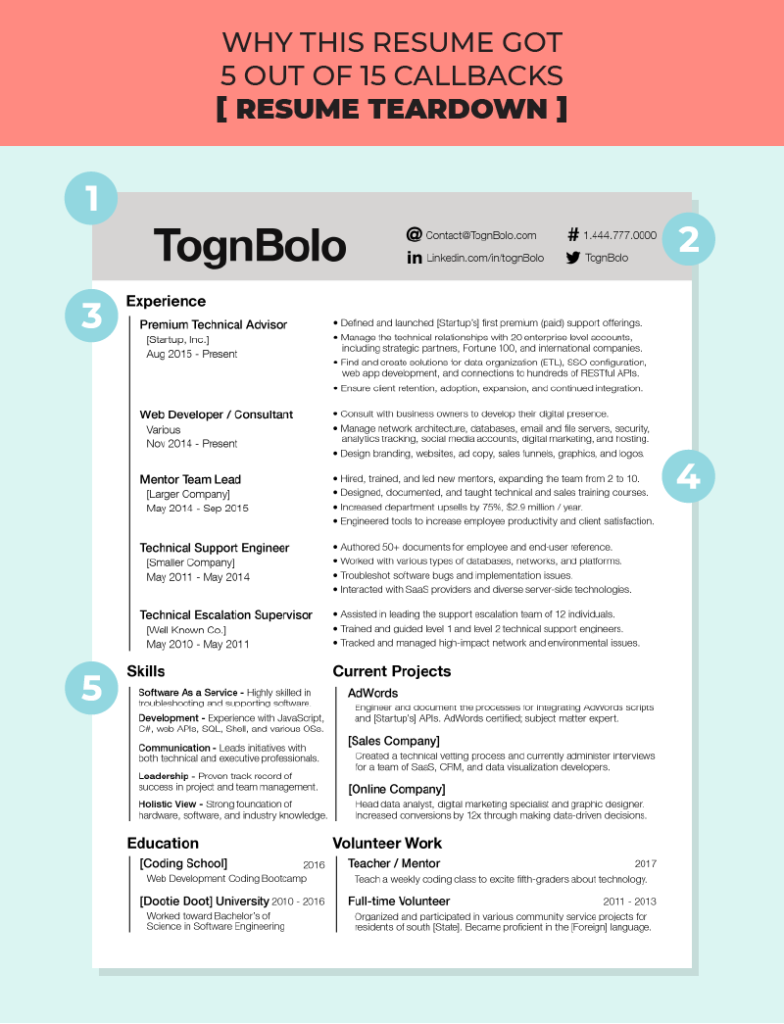
Why This Resume Got 5 out of 15 Callbacks [Resume Teardown]

togn bolo resume review

Most resumes today are either too traditional or overly artistic. Like it or not, unless you are seeking for employment in a more “serious” industry (e.g. law, banking…), applying for jobs with a traditional resume is no longer going to cut it. We came across this resume template on Reddit and absolutely love it for its minimal form factor. Besides, this CV also scored the applicant, Togn Bolo, a whopping 5 out of 15 callbacks and a 50% salary increase! Let’s see how you could emulate Togn’s success for your own resume template:


1. Clean Resume Design

Togn found a sweet spot in between the two and brought this aesthetically-pleasing functional resume to life. A clean resume design like Togn’s uses only a single font family with multiple weights, along with plenty of whitespaces to provide visual breathing room for the eye.


Noticed how there are no images used in the resume? Unless otherwise specified by the employer, you don’t have to waste your resume’s real estate by including a picture of yourself. It’s pointless, really, as interviewers would still check out your online profile, which brings us to point 2 below.


2. Contact Details and Links to Professional Profile

You probably already have your contact details such as phone and email on your CV. Since this is the 21st century, take the cue from Togn and include links to your professional social media profile on your resume.


We emphasized on the word “professional” because you really shouldn’t include links to every single social media network you’re on (unless you’re applying to be a brand ambassador or influencer). You can’t go wrong with a professional LinkedIn profile that works hand-in-hand with your resume. Bonus points if you have past employers’ or colleagues’ recommendations on your LinkedIn profile!


Though we said not to include links to other profiles, chances are employers would still look you up on Google. Now is the time to own your digital footprint and start spring cleaning your social media profiles from vulgarities or silly remarks that would land your CV in the rejected pile.


3. Work Experiences Come First

Unless you are a fresh graduate, your professional experiences always come first. The best way to present your past working experience is to follow a reverse chronological order. Start with your latest career at the top, down to the oldest one at the bottom.


If you have completed any projects or voluntary work, you should definitely list them after your experiences. Don’t have anything else to add? Try with a skills section to highlight your skills. Or a language section if you are multilingual.


4. Optimized Content for Readers

Put yourself in your readers, in this case, interviewers’ shoes. No one likes to read dense block of texts going on and on. Cut out unnecessary words and split them with bullet points. For instance, you could see that Togn has only 3-4 bullet points for each of his past experience.


Numbers also bring more meaning to texts. If you have done something extraordinary in your previous jobs, for instance increasing upsells by $2.9 million per year, you should absolutely list it on your CV.


Next, do not use any pronouns such as “I”, “he”, or “she” on your resume. You can see that Togn didn’t used any and goes straight into the action.


5. Optimized Content for Bots

Putting the readers aside, you should also optimize your content for the bots, and by bots we meant the Applicant Tracking System (ATS) that hiring managers used to scan the numerous resumes they received on a daily basis.


Basically what an ATS does is it scans your resume for keywords that relate to the position you are applying to. Hence, the no-brainer way to score on ATS is to read the job description carefully for keywords used, and then implement those keywords into your CV.


So keep these 5 things in mind when you are building your resume template. If you already did, let us know if it helped you score an interview or even nailed you your dream job at the comment section below!

The post Why This Resume Got 5 out of 15 Callbacks [Resume Teardown] appeared first on Resumeshoppe.com.

http://ift.tt/2F3eqgp


from WordPress https://loulouwakefield.wordpress.com/2018/03/01/why-this-resume-got-5-out-of-15-callbacks-resume-teardown/

Thursday, February 15, 2018

10 Genius Answers to Interview Questions – and 3 Not so Genius

Are you about to take an interview for a job but you’re worried about impressing your potential employee?

Coming across well in an interview is difficult, especially as there are probably loads of other people applying for the same job.

You can do as much preparation as possible, but when it’s just you and them in the room, you have to make sure you bring you’re A game.

There was a recent post on Reddit that asked hiring managers about times when candidates managed to answer a certain question fantastically. Here are 10 of these picked out to hopefully give you some inspiration on the big day…

I could Google it 

Google It

One guy was very well qualified and answered all the questions right. He drew a blank on one of the further questions but followed up with ‘I could google it easily’.

So I jokingly asked ‘what if you were unable to google it?’ And he answered ‘If this job is somewhere where I can’t access google I don’t want it’.

I want to make a lot of money

Money

Why do you want to work here?

“I want to make a lot of money, and this company seems like the best place where I can make that money”.

Honesty is the best policy

What interested you in this position?

“Well, you’ll have to excuse my French, but in my past I f****d up. I f****d  up a lot, and it f****d  up my life. And if I can help someone stop themselves before they f**k their own shit up, then I’ll have made a difference.”

I can do anything. I grew up on a farm!

farmwork

Was interviewing a young woman for an admin assistant position in an electronics R & D lab. Asked what she could do. She very casually replied, “I can do anything. I grew up on a farm.”

Apply in crayon

crayon

A guy turned in an application written in red crayon on a piece of cardboard. On the piece of cardboard was his name, number, experience in the field and the declaration that he isn’t an a**hole

I called him and we arranged an interview for the following week, and he was a very professional and genuine candidate. Unfortunately I was unable to hire him but when I asked him about the cardboard application he responded “it got me this interview, didn’t it?”.

Greatest weakness?

“What is your greatest weakness?”

“This question.”

I’ve been married three times

rossfriends

Interviewing for a sales position and we always ask the question, “how do you react to rejection?” To which he replied, “well I’ve been married three times, so what do you think?” He was hired on the spot.

I wanna work with that guy!

I was hiring a second videographer. We were doing an interview that included my current employee. I  asked the candidate to describe his ideal co-worker. He pointed at our videographer and said “that guy.”

He was hired.

I’m the only candidate that didn’t lie

I’m not exactly answering your question, but my entire career is based on the fact that I was the only candidate that didn’t lie about it. This particular piece of software hadn’t been built yet. Everyone except the candidate said yes.

I always give 110%

A candidate poured boiling water in a cup to make tea, but poured in too much, which in turn spilt the water all over the desk. Despite his shock at the situation, he then calmly said “Don’t worry, I always give 110%.”

Leave out the salary talk..for now

When I asked a candidate the dreaded salary question. His response was.

“I’d like to leave that out at this point. Let’s see if I’m a good fit for the position and that the position is a good fit for me. If we both agree, then we can talk about salary.

Hopefully there should be enough quality in here that you can take into your interview. Funnily enough, there’s another thread on Reddit that asks the opposite – so here are 3 not so genius answered that pretty much disqualified candidates from having a chance of getting the job.

My mother forced me to be here

After very vague and empty answers to the standard questions, the candidate was clearly not making any effort at all. I asked him, “Do you really want to work here?” He looked me in the eye and said, “No. My mother forced me to put in all these applications and answered the phone when you called so I had to come in.”

Anti-Semitic candidate

“Why did you move from Florida to Texas?”

“There were too many Jews in Florida”

This sounds like a chill job for the summer

I sat in on an interview. This is a career type position with a huge company.

Everything goes well until the candidate is asked the final question “If you’re successful in your interview today, where do you see yourself with us in five years?”

“Oh no, I think this just sounds like a chill job for the summer”.

Some people don’t help themselves…


The post 10 Genius Answers to Interview Questions – and 3 Not so Genius appeared first on Resumeshoppe.com.

http://ift.tt/2EqsV9C


from WordPress https://loulouwakefield.wordpress.com/2018/02/15/10-genius-answers-to-interview-questions-and-3-not-so-genius/

Wednesday, December 20, 2017

How to Create a Resume in Apple Pages [Mac]

how to create a resume in apple pages mac

This post is dedicated to Mac users who wants to make their own resume with Apple’s word processing software – Pages.

Rather take a professionally crafted template? Click here and get your template for under $10.

Difficulty Level: Beginner
Requirements: Any Mac operating system with Apple Pages installed

Before we begin, we would like you to know that this tutorial is made on a Macbook Pro running Mac OS X El Capitan (version 10.11.6), with the assistance of Apple Pages (version 5.0.1). If you are using the latest Mac OS – High Sierra, there would be slight difference in terms of user interface, but in general most features in Pages would work the same way.

Step 1: Launch Pages from Applications

Open the Apple Pages app located in your Applications folder. You will be greeted with the following window. If you don’t see this window, go to your top menu bar and select File > New… (or use the shortcut Cmd+N).

choose a template in apple pages

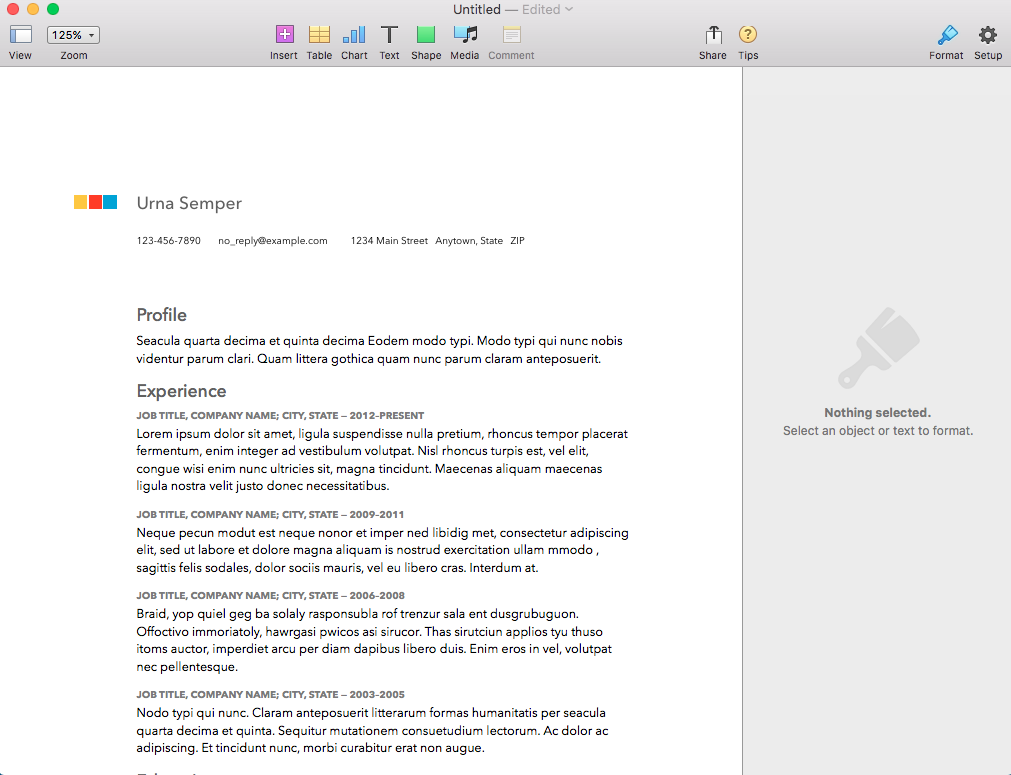
At the left sidebar, navigate to the Stationery tab, scroll down to the Resume section at the main column, then pick a resume template that you like. We selected the Modern Resume template for this guide.

modern resume template in apple pages

Step 2: Replace the Resume with Your Details

By default, the Pages template is pre-populated with dummy info. Go ahead and replace all the dummy details with your own information. If you need help with your resume’s content, check out the resume writing service offered by our professional resume writers.

For starters, you can remove categories you don’t need by selecting it and hit on the Delete key. To add more categories such as Awards (or Accomplishments), the best way is to copy and paste from another category to retain its formatting.

One downside to this template is that it lists out your work experience as a chunk of long-winding paragraphs. Ideally you would want to avoid doing this as recruiters can be put off by it.

long paragraph in resume

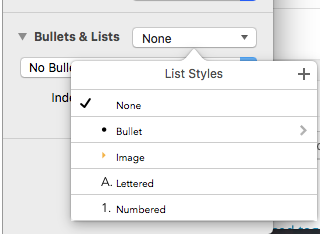
If you had an extensive job scope for your previous job, split them up using bullet points. To add bullet points in Pages, go to the Bullets & Lists feature located at the right sidebar, then click on the dropdown option next to it and select Bullet.

how to add bullet point in apple pages

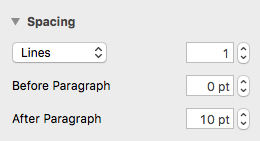
You can also adjust the spacing between lines and paragraphs by changing the values here:

how to adjust spacing between line and paragraph in apple pages

Here’s how our sample resume looks like after replacing the contents with that of a fictional person:

modern resume template in Apple Pages

Step 3 (optional): Change fonts and colors to match your style

This modern resume template from Apple Pages uses Avenir Next as the default font. If you are feeling adventurous, you could also play around with different font styles.

We switched up the Headings and Subheadings with a serif font – Baskerville. We also removed the squares next to the name as it do not add any real value to the resume.

Here’s how our final sample resume looks in Pages:

modern resume design mac pages

Step 4: Save and Export Resume

Done? Double check your resume for spelling and grammatical errors. Pro tip: read your resume out loud to spot obvious mistakes such as the misuse of “then” or “than”, “your” or “you’re” etc.

If everything is correct, click on Command+S (shortcut for Save) on your keyboard to save your Pages file or go to File > Save… .

save Pages file on mac

Since you might be using this resume to apply for jobs (we hope), go to top menu again and select File > Export to > PDF… in order to export the Pages file as PDF.

how to export pages file as pdf on mac

In the pop-up window, you can choose to have Good, Better, or Best image quality for your PDF export. We always go with the Best option so that the PDF looks good on print too.

pdf export with best image quality


Congratulations! You are all set to deliver your homemade PDF resume to interviewers and hiring managers. We hope that you learned how to make your first resume on Mac using Apple Pages after reading this tutorial.

Looking for a one-of-a-kind resume template that can be edited in Apple Pages on your Mac? Below you’ll see one of our Pages templates..we have many more in our shop!

black and white minimal resume template

The post How to Create a Resume in Apple Pages [Mac] appeared first on Resumeshoppe.com.

http://ift.tt/2BHsZkR


from WordPress http://ift.tt/2Bn2xQx

Monday, August 7, 2017

Download a Free Infographic Resume! [No Strings Attached]

free download infographic resume for designer

Just starting out as a fresh graduate with a design background? Check out this free turquoise-themed infographic resume that you can use to showcase your creativity to hiring managers and land your dream design career. What’s more? The free resume comes in .Ai format so you can tweak it as you please before sending it out to interviewers.

This infographic resume has a side column for your personal info, especially useful if you’d like to promote your online portfolio. To add a touch of your own personality, you can include a picture of yourself or go above and beyond by designing your own avatar.

Use the Creative Tools section to show your skills with design softwares. It is populated with Adobe Photoshop, Illustrator, InDesign, and Lightroom by default. You can always add or remove the layers in Illustrator.

If you are aiming for multinational companies, being multilingual might help you fare better against the other applicants. In that case, list out the languages that you know well under the Language Skills section.

There’s a lot of designers out there but what makes each of them different is their field of designs. If you know the areas of design that you are great at (e.g. logo design, icon design, print design etc.), simply lay them all out under the Design Fields category and adjust the shapes according to your capabilities with the different fields.

Finally, describe your education background and your interests so that employers would be intrigued to invite you for an interview.

How to Download this Cool Infographic Resume Template?

It couldn’t be more simple. Just click the download link below ↓ ↓ ↓ ↓


Free Download Infographic Resume

Don’t know how to work with Photoshop or Illustrator? Then take a look at our resume templates for Word. These are so simple to edit… even your grandma could use them. 🙂

Have some designer friends? Share this page with them via the buttons ↓ ↓ ↓ ↓

The post Download a Free Infographic Resume! [No Strings Attached] appeared first on Resumeshoppe.com.

http://ift.tt/2vwOWm0


from WordPress http://ift.tt/2fmwW77

Wednesday, March 15, 2017

How to Use LinkedIn to Find a Job in 2017 [7 Shortcuts]

In the days of yore, long before we used Linkedin to find a job, you typed out a tidy little one page resume full of bold, largely unverifiable claims about your education, skillset and business acumen, dropped it off at XYZ corps’ personnel department and waited by your big black rotary phone for someone to call you back.

When they did you went in and lied through your teeth about your experience…

“Yes Sir. Ambassador to Margaritaville – 1977 to 1981.”

What you could do…

“That’s right. 223 words per minute. But I’m afraid I sprained my pinky yesterday so for the moment I’m limited to 17 words per minute. Quality words though!”

And why you’re currently unemployed…

“The CEO and I differed on which direction to take the company.”
“But it says here you were ‘Janitor’.”
“No, heavens no! That’s a French word; “zhah-nah-tour”. Roughly translated to English it means ‘VP in charge of Everything’. Swear to God.”

Guy with chaos at workIf you were lucky and your interviewer was sleep deprived or had at least slept through French class you may have secured the coveted “Welcome aboard” handshake before your cup of skanky complimentary coffee got cold(er than it was when they served it to you).

Today, however, we live in a new world where technological miracles have linked the entire human race together in a digital web of unimaginable size and complexity.

A job searcher today literally has the entire planet at their fingertips as do companies looking to fill vacancies.

So scamming your way to the top is no longer the option it was years ago (unless of course you’re a politician).

Problem is, having too many job openings available or too many respondents can actually bog the process down.

What you need is a job search platform that’s more than just a glorified collection of dead ends. In other words you need LinkedIn job search.

A Few Tips on Using LinkedIn to Find a Job in 2017

If you’re like most people you’ve kissed a lot of frogs in your search for the Prince of Jobs. The good news is that those days are over. The bad news (although admittedly it’s not that bad) is that you’ll still have to do a bit of work to get what you want.

However, because you can be sure LinkedIn is going to filter out the amphibians any time spent learning how to use LinkedIn to find a job in 2017 is likely to be well spent.

1) Filters are Good for More Than Making Coffee

When searching for jobs on LinkedIn you’re able to filter for industry, job title, location, experience level, salary, whether the company uses free-trade coffee in the break room and much, much more.

Okay, so you won’t be able to find out whether they offer free-trade coffee but there’s no need to get upset about it.

So anyway, right off the bat you know you’re going to get search results that mean something. Knowing that you can then use to the rest of our tips to optimize your search in a way that returns the greatest number of open, relevant positions.

2) Update Your LinkedIn Profile

Your LinkedIn profile is the window you allow the outside world to look through in order to get a picture of who you are. Does that have some creepy, voyeuristic implications? You bet it does. But as McAuley said to Hanna in “Heat”: “It’s either that or we both better find something else to do.”

If what the HR voyeurs see is old furniture, an out of date calendar and dirty dishes in the sink they’re not coming back for a second look.

You want the part of your life you make public to reflect good taste, thoughtful decision making and potential. Lots of potential.

Update your profile before you do anything else.

3) Install the LinkedIn Jobs app:

While it may not be the greatest thing since sliced bread like the good folks at LinkedIn would have you believe (that honor clearly goes to “buy 1 get 1 free” pizza) the LinkedIn jobs app can still save you time and trouble.

You’re able to save searches and set up new listing alerts so you can be among the first 11,528 people who apply when a job comes online.People working with their hands

No, seriously; let’s say you’re looking for a graphic designer position in Jersey City (Did I just mention Jersey City in an article?).

If you save that search on the LinkedIn app and then set up a corresponding alert your phone will have a little hissy fit whenever someone in Jersey City(!) lists a graphic designer position.

You’ll have more time to dedicate to your milk bottle collection while you wait for the perfect job to make its way down the digital turnpike.

4) Keyword, Keywords, Keywords

It may be money that makes the world as a whole go round but when we’re talking about anything search-related it’s keywords that have that distinction.

Without relevant keywords to aid in your search you’re going to be sifting through lots of jobs that may be perfectly suitable for your cousin Earl as he transitions from the halfway house to the real world but won’t have anything to do with what you’re looking for.

Be specific and be flexible: graphic designer, graphic design, design work, print design and so on and so on. You’ll save yourself a boatload of headaches and won’t ever find yourself sitting opposite cousin Earl in any interview waiting rooms.

5) Don’t Forget all Those LinkedIn Connections in 2017

You have lots of LinkedIn friends, right? Right? Okay. So if they’re really your friends they won’t mind you sifting through their profiles to find out what type of work they do and for who.

You’d be amazed at how a little trick like this can generate envy that burns with the heat of a thousand suns.

Or, conversely, informs your job search and sends you off down paths that may unexpectedly take you exactly where you want to go.

Just a tip: try to keep the white hot envy in check when you see how much better others are doing than you. It won’t really help your job search, even if it could possibly result in a viral YouTube video somewhere down the line.

6) Take Advantage of the Scores of Companies Using LinkedIn

One way to find out if the company you’d like to work for is hiring is to visit their LinkedIn page. There are tons of businesses these days that are using LinkedIn as a major resource for talent identification so if you’re trying to learn how to use LinkedIn to find a job, there you go.

Always dreamed of working for Oracle? As of this writing they’re listing more than 500 jobs on their LinkedIn page. How about Apple? Ever heard of them? They have nearly 2,000 jobs listed on LinkedIn.

On the right sidebar of each company page there is also a list of similar companies so if one doesn’t have what you’re looking for just try another.

If you’re a business owner there are also things like LinkedIn Small Business resources that make it really easy to post job listings and attract the kind of talent you’re after. So what are you waiting for? Take a break from procrastinating and get busy already!

7) Accountability

We need to say a few words about accountability before we bring proceedings to a close here. It’s true that in the golden days of yesteryear the Personnel Manager had to take your word on a lot of things.

Unfortunately for those naturally inclined toward, let’s call it “embellishment”, those days have slipped into golden memory.

Today, the same technology that allows you to search job databases in other countries at the touch of your screen also allows HR drones to scour countless other databases to see if your claims stand up. And this is true whether you’re using LinkedIn as your primary job search utility or something else. So play it straight and you’ll avoid a lot of downstream headaches.

The Brave New World Needs You

Picture of guy in a business suitThe job market is not what it was in the days when Ashton Kutcher and Demi Moore were wooing each other over jello shots.

For better or worse the world has moved on and those who refuse to move on with it are those who might as well shutter their ambitions, marry their cousin and run weekly car washes to pay the bills.

If you’re serious about finding the right job instead of just a job LinkedIn jobs listings and the other tools and tips listed above will help you reach the promised land. The brave new world has arrived and it’s as scary as it is exciting.

Embrace the challenge by making sure you find the job that best suits your skills and temperament. Do that by putting LinkedIn job search to work for you.


The post How to Use LinkedIn to Find a Job in 2017 [7 Shortcuts] appeared first on Resumeshoppe.com.

http://ift.tt/2nE8Gwo


from WordPress http://ift.tt/2mrDdwn
Thursday, November 24, 2016

Random ramblings…

Sitting behind a computer all day…is that something we should do and want? I mean, ARE WE MADE FOR THIS? Not if you ask me.


Still I’m doing it, all day long. Hmmm.


from WordPress http://ift.tt/2gl3vl0

How will the IVC Filter lawsuit develop in 2017?

As you probably heard there have been a lot of problems with IVC filters (IVC stands for Inferior Vena Cava). The legal battle to combat Bard and other companies started in 2012 and over the next few years, several individual lawsuits were filed.

In 2017 we expect to see many more of these cases and possibly class action. For more info on the case and the risks of using an IVC filter, have a look at http://ift.tt/2fbzi7S

Bard ivc filter 2017


from WordPress http://ift.tt/2gjVY1T

Monday, October 17, 2016

Google anonymously posted math equations on billboards to entice job-searchers

In 2004 Google had a problem, they needed more brainy engineers on their team. So what did they do? Instead of putting up an ad or 2 in the local newspaper they come up with a brilliant soultion. Google started a recruiting campaign that involved setting up a billboard along Highway 101 in California’s Silicon Valley.

billboard_large

The sign reads: {first 10-digit prime found in consecutive digits of e}.com

The correct answer to the banner problem leads to a URL (The website was 7427466391.com, but unfortunately no longer works) where there is yet another puzzle solve. Eventually, the determined problem-solver lands at a Google Web page that asks the smart, or lucky, few for a resume.

Google’s research and development department had this to say about the campaign:

“One thing we learned while building Google is that it’s easier to find what you’re looking for if it comes looking for you. What we’re looking for are the best engineers in the world. And here you are.

“As you can imagine, we get many, many resumes every day, so we developed this little process to increase the signal-to-noise ratio.”

Sources: Google Blog

Also check out: The #1 Trick That Google Uses In Salary Negotiations And What You Can Learn From It

The post Google anonymously posted math equations on billboards to entice job-searchers appeared first on Resumeshoppe.com.

http://ift.tt/2eeOTPU


from WordPress http://ift.tt/2dmF6FV

Friday, October 14, 2016

The #1 Trick that Google uses in salary negotations and what you can learn from it

For most people salary negotiations are like a blind date. You hope things go well, that your opposite number is attentive and that they give you something more than a polite handshake and “Let’s stay in touch” upon parting. But there’s no way to be sure.

In fact, most people who’ve been on a blind date know that one person usually winds up controlling the narrative because they’re either hot or rich or a little bit smarter and just snarky enough to take advantage of that fact.

What you want to avoid like the plague is the salary negotiation that turns into that one-sided blind date with you, of course, picking up the tab and telling yourself she forgot to take the flowers because she had a lot on her mind. Sure she did.

The First Step in Avoiding a Trap is Knowing of its Existence

google lunch foodIt’s pretty well recognized that nobody does one-sided blind dates better than Big G. The Internet is rife with those who’ve come out of salary negotiations with Google thinking they were going to get a big smooch but instead got a disingenuous half smile and “I just don’t think about you that way”.

One of Google’s favorite ways to set you up to believe you’re about to get lucky is by dangling their vaunted food benefit in front of you.

Here’s how it works:

You: “90 huh? Interesting. But not quite what I had in mind.”

Big G: “Have you heard about our food benefit big boy?”

You: “F-f-food benefit?”

At this point you feel a foot slowly run up your leg under the interview table.

Big G: “Sure. You know our food benefit alone is worth $X a month and you can be sure it’s all super-delicious, high-quality comestibles.”

You (beginning to sweat and envisioning sumptuous banquets of corporate love): “Gee. That uh, sounds pretty good. Will, uh, will you be… joining me?”

Big G: “Of course silly!”

You: “Well then, where do I sign!?

A month later your free meals are harder to find than a virgin at a disco and that HR drone who seduced you has moved on to someone new. So what happened here?

What happened is that you fell for Ye Olde Benefit Mirage. Big G dragged out something they already give away for free and stuck a value on it in order to try and give the appearance they were moving in your direction.

They weren’t of course but you were so taken off guard by their pseudo value-added proposition that you let them wrest control of the negotiation from you. (Later, they’ll slowly withdraw the “perk” because, after all, they never said they wouldn’t.)

So what’s the lesson here? Well, first of all never negotiate with someone who’s running their toes seductively up your pants leg and second, recognize the trap that’s being laid for you and politely sidestep it.

Big G: “You know our food benefit alone is worth $X a month and you can be sure it’s all super delicious, high-quality comestibles.”

You: “You know if I could pay my mortgage in arugula that might interest me.”

See how easy that is! Everyone laughs. The HR drone has new respect for your negotiating skills and no one is left holding a bouquet of dying flowers at the end of the night.


The post The #1 Trick that Google uses in salary negotations and what you can learn from it appeared first on Resumeshoppe.com.

http://ift.tt/2ea5wRl


from WordPress http://ift.tt/2e6wncE

Friday, October 7, 2016

The Pros and Cons of Job-Hopping

Does the idea of staying at the same job for ten years or more make you flinch? Don’t worry, you’re not alone.

The opportunities of being in the very same job from the time you go into the workforce to the time you retire are at an all-time low. The generation presently entering the labor force is not enamored with the idea of sticking with one job for several years and doesn’t believe that it must be expected. Unfortunately, the generation that is most likely to have seniority, the Child Boomers, is less likely to concur.

Job-hopping has its positives, though. If you remain in the exact same function in the same industry, changing jobs typically can offer a sensation of freshness and development even. Even if you’re not leaving your job willingly, benefit from making a change and do what you can to make it a change for the better.

Check out the infographic below and find out what the pros and cons of job hopping really are:

the-pros-and-cons-of-job-hopping

Source: Ajilon.com

The post The Pros and Cons of Job-Hopping appeared first on Resumeshoppe.com.

http://ift.tt/2ea1De7


from WordPress http://ift.tt/2d8YyZY

Friday, September 2, 2016

7 Powerful Questions That Will Blow Away Your Interviewer

When it comes to landing that dream job, having a well designed resume is good, but how you conduct yourself in the interview is just as crucial. Check out these 7 questions that will help blow away your interviewer:

7 Powerful Questions That Will Blow Away Your Interviewer

Share this infographic on your site:

Just simply copy the code below and paste it into your blog!

<p>Thanks to ResumeShoppe.com for this infographic.</p><br /><br /><br /><br /><br /><br /><br /><br /><br /><br />
<p><a href=’http://ift.tt/2bHxAox src=’http://ift.tt/2bHz0Ea; alt=’7 Powerful Questions That Will Blow Away Your Interviewer’ width=” border=’0′ /></a></p><br /><br /><br /><br /><br /><br /><br /><br /><br /><br />
<p>

The post 7 Powerful Questions That Will Blow Away Your Interviewer appeared first on Resumeshoppe.com.

http://ift.tt/2bHAg5a


from WordPress http://ift.tt/2bHOnh0

Thursday, August 25, 2016

The Truth About Lying on Resumes

Trying to get a job is a daunting process, regardless of how qualified you might be. Sometimes you might be tempted to stretch the truth a little bit and it seems like you’re not alone.

According to the infographic, 46% of submitted resumes contain some measure of false information. Pretty crazy!

What do these people lie about? Well check out the infographic below for the full story!

The Truth About Lying On Resumes

From Visually.

The post The Truth About Lying on Resumes appeared first on Resumeshoppe.com.

http://ift.tt/2bl8J9M


from WordPress http://ift.tt/2bIyFQL